
Classic Rogue
Classic Rogue. Dan’s MEGA65 Digest for June 2026.
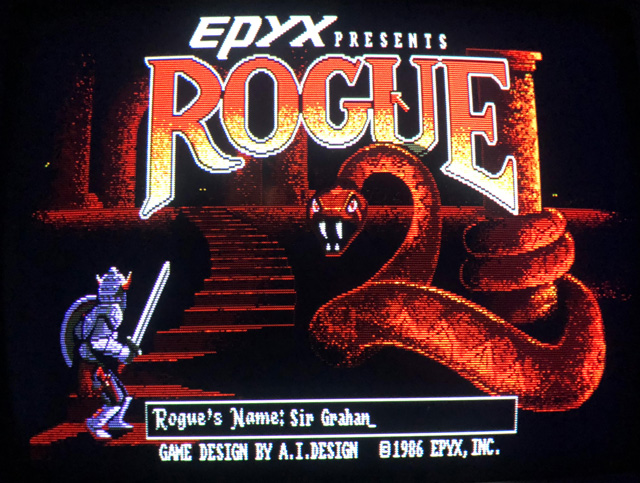
It’s the game that defined a genre. Rogue: Exploring the Dungeons of Doom by Michael Toy, Glenn Wichman, and Ken Arnold took college campuses by storm in the early 1980s, as a freely distributed game for Unix-based mainframes. Toy and Wichman formed a company to develop versions of Rogue for microcomputers, distributed by Epyx, with notable releases for the Amiga, classic Mac, and Atari ST. It inspired similar dungeon crawlers The Dungeons of Moria (1983), Hack (1984), NetHack (1987), and the Tolkien-themed Angband (1990). NetHack and Angband are both in active development today.
Rogue’s distinctive combination of gameplay properties, especially procedural level generation, turn-based movement, and “permadeath,” have persisted in video games over the decades, including recent commercial successes such as Diablo, Spelunky, and Hades. Hobbyist developers love to make “Roguelikes,” and the annual Roguelike Celebration joyfully encourages creative computing through personal game development. The Roguelike Celebration YouTube channel is packed full of informative and inspiring talks from the last ten years.
And of course, Roguecraft DX for the MEGA65 (and Amiga, Game Boy Color, Evercade, and modern PC) by Badger Punch Games is a clear descendant of the seminal Unix game.
The authors of the original released the C source code for the Unix version of Rogue under the BSD open source software license in 1986, currently maintained by David Silva. That got me wondering: how could I use the original code to make a faithful version of classic Rogue for the MEGA65?
In this Digest, we’ll cover how to play the original Rogue on a modern PC by building its vintage source code in just a few easy steps. We’ll look around the code to see how it works, and chart a path to porting the game to the MEGA65. Next month, we’ll return to the Calypsi C compiler, see how to build large projects with the tools, and get a real MEGA65 version of Rogue up and running. Spoiler alert: Rogue is much larger than 39 kilobytes.
BitBinders MEGA1581 external drive
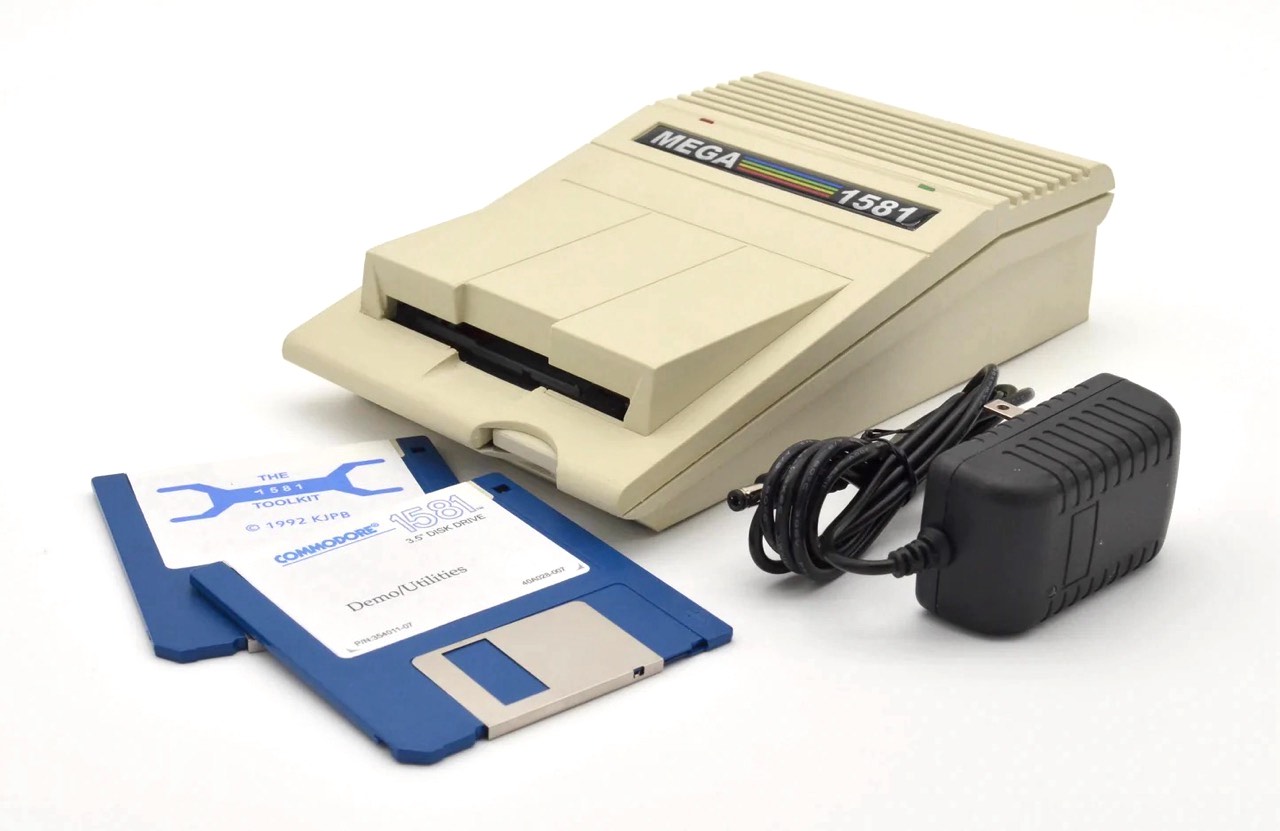
The BitBinders MEGA1581 external IEC floppy drive.
BitBinders is now taking orders for the MEGA1581, a MEGA65-themed external 1581-compatible IEC 3-1/2" floppy disk drive. BitBinders has been making 1581-compatible external drives in interesting form factors for several years. This new drive has a case that matches the shape and color of the MEGA65, taking its place literally by its side. The drive includes JiffyDOS and a 12-month warranty.
Craig has shown prototypes of this model at recent computer shows. I have a BitBinders dual drive, and it’s good quality and fun to use. Congrats to Craig on the launch!
The Ultimate MiSTer2MEGA65 Porting Guide
As we know, the MEGA65 is just one kind of computer a MEGA65 can be. You can load alternate cores into the MEGA65’s FPGA to run cycle-accurate recreations of other famous microcomputers and arcade game machines, including the Commodore PET, the VIC-20, the Commodore 16 / plus/4, the Commodore 64, the ZX Spectrum, and the TI-99/4A. And the list keeps growing.
Hobbyists have been recreating vintage microcomputers using FPGAs for over a decade, with a great deal of work going into producing high quality cores for the MiSTer FPGA platform. MJoergen and sy2002 created the MiSTer2MEGA65 framework to make porting MiSTer projects to the MEGA65 hardware easier, and this framework is the basis for many (but not all) of the MEGA65 alternate cores currently available. You can also use the framework for all-new recreations, as well as original computer designs, taking advantage of the framework’s well-documented connectivity to the MEGA65 input/output hardware.
MJoergen and sy2002 just launched The Ultimate MiSTer2MEGA65 Porting Guide, a comprehensive step-by-step technical manual for using the framework to bring MiSTer projects to the MEGA65. Many hard-won lessons porting cores are fully documented to support future projects. The guide is highly technical, but also walks through every part of the process of porting a MiSTer core to the MEGA65. I’m looking forward to trying this myself.
Huge thanks to MJoergen and sy2002 for this new book, and for their ongoing contributions to the MEGA65!
Upcoming shows in the USA
Vintage Computer Festival Pacific Northwest 2026.
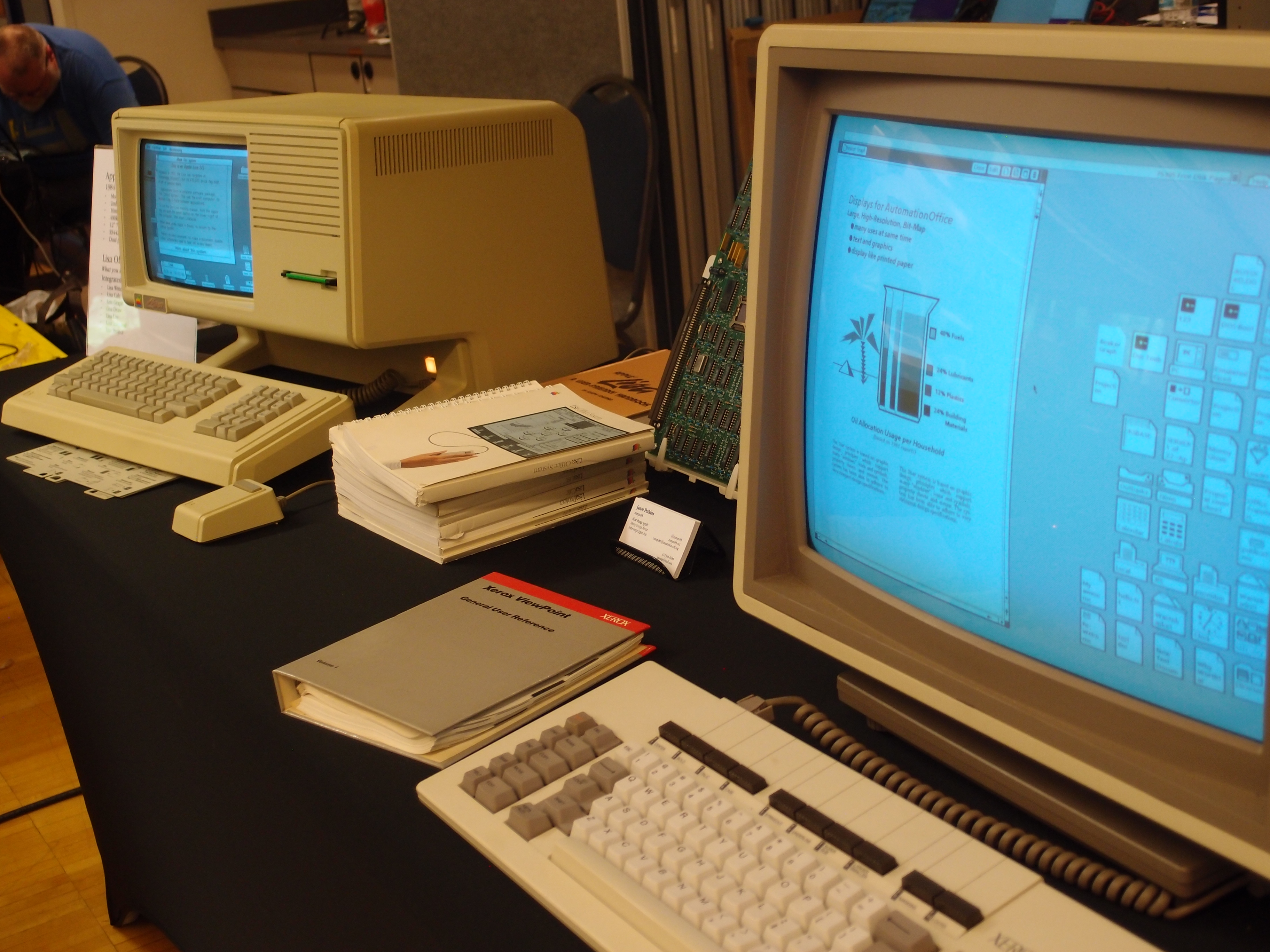
Vintage Computer Festival Pacific Northwest 2026 took place in May, and the MEGA65 was there! Roguecraft DX was a huge hit, and people also came up to the booth to write BASIC programs and ask lots of questions. The show spanned many decades of computing, with some rare pieces in miraculously working condition available to try. Check out the shared photo album from the event.
I will be bringing the MEGA65 booth to these upcoming events around the United States:
- Pacific Commodore Expo Northwest, Seattle, WA, June 20-21.
- Vintage Computer Festival West, Mountain View, CA, August 1-2.
- Vintage Computer Festival Midwest, Shaumburg, IL (outside of Chicago), September 12-13. My exhibit has not yet been confirmed but they haven’t turned me down in past years. Last year they just kept growing the space to accommodate all exhibitors, it was wild.
How to play Rogue
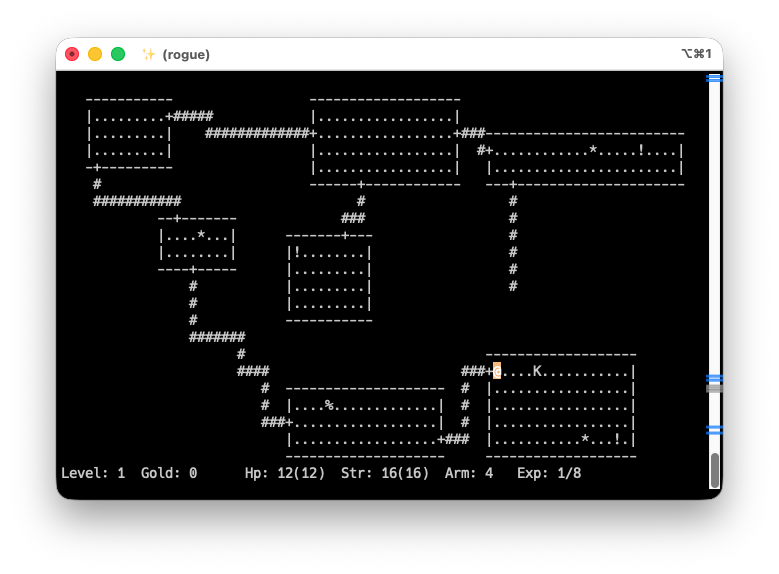
For the sake of running on modern computers, Rogue is distributed as C source code. You can compile it for your PC with the most common C compiler toolchains, with the included GNU Autotools configure script and GNU Make. On Linux, you probably have the tools installed already. On macOS, xcode-select --install gets you everything you need. Windows users have plenty of options (MinGW, Windows Subsystem for Linux, Cygwin), but I don’t have regular access to a Windows computer so you’ll have to find them yourself.
With the appropriate tools installed, and the Rogue source code downloaded and unpacked in a folder, open a command prompt (terminal) window. Change the current working directory to the Rogue source folder, run the configure script, then run make.
cd
./configure
make
This produces the rogue program. To start a game, run the command.
./rogue
The game runs inside the command prompt (terminal) window. If the program exits immediately back to the command prompt, your window may be too small. Rogue needs the window to be at least 80 columns wide and 24 rows tall. It can be larger, though Rogue will keep itself to the upper-left 80 x 24 area. Already this is good news for a MEGA65 port: we have an 80 x 25 character display we can use.
Each game of Rogue is different. The layout for the entire dungeon, including the locations of treasures and enemies, is generated based on a pseudo-random number generator and a seed value. You begin knowing only about the room where you first appear. The rest of the dungeon is for you to explore and discover, making a map as you go.
You begin in the first room of the first floor of the dungeon, shown in a top-down view. You are the @ symbol. The rectangular room may or may not contain other items, creatures, or a staircase to a lower level. You should see at least one door to a hallway, the + symbol. Hallways (#) connect rooms. (On rare occasions, hallways may have dead ends.)
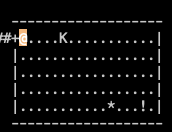
Rogue is a turn-based action game. To take an action, press a key. For every action you take, other creatures in the dungeon may also take an action. If you’re not pressing a key, the game is effectively paused.
With so many keys and so many characters, it can be difficult to keep track of what everything does or is. Thankfully, Rogue includes a built-in help feature:
- To see a list of available actions, press
?, then press*. To be reminded of what a specific key does, press?, then press the key. Notice that letter keys may be indicated as lowercase or uppercase; uppercase means hold Shift while pressing the key. - To identify any on-screen character in the game, press
/, then type the character. For example, typing/then+will remind you that+is a door. The game will not display a master list of all possible things. That’s for you to discover as you play.
The game describes the results of actions at the top of the screen. If you see --More--, press the spacebar to dismiss the message. Other messages are dismissed by pressing Enter; it’ll say so. When the game asks a question, it typically expects a single keypress as a response. Spacebar will cancel the action that prompted the question. Escape can also cancel some prompts or exit some screens. On occasion, the game will prompt for a word or phrase.
There is a way to complete the game. Locate the Amulet of Yendor below the 20th floor of the dungeon, then escape with your life. According to the Rogue user manual, “Nobody has achieved this yet and if somebody does, they will probably go down in history as a hero among heroes.” Of course, some people have indeed achieved this in the last 46 years. But take it as a warning. This feat is quite difficult, and most players just gather as much gold as they can before they are viciously murdered by a bat or a hobgoblin.
Part of the fun of Rogue is figuring it out as you go. I recommend playing it without knowing more about it. For the sake of the porting project, I will describe the game further, but consider the rest of this article to be a mild spoiler. Of course, the source code itself is a complete spoiler for the game’s surprises.
Rogue gameplay in more detail
To move, use either the cursor keys (up, down, left, right), or the following keys for all eight directions:
 y  k  u
  \ | /
h -   - l
  / | \
 b  j  n
Every item you find can be picked up, and every creature you find can be fought. To pick up an object or fight a creature, simply walk into it.
Keep an eye on your health points (Hp) at the bottom of the screen. If this reaches zero, you die, and the game is over. This will happen often. Health points regenerate gradually over turns not spent fighting. To spend a turn without taking any action (thus regenerating health points), press . (period).
Letter characters represent creatures. Some creatures will chase you, others may leave you alone unless you torment them. When an upset creature is next to you, it may attack you for its action, even if you don’t attack it. Creatures will chase you down hallways to other rooms. They’re relentless.
Other things you might find:
- Gold (
*) : Collect gold to increase your score. - Food (
:) : You keep a supply of food in your inventory. Occasionally, you will feel “weak.” Press e to eat food to restore your constitution. If you don’t have food, weakness impedes your performance. - Potion (
!) : Each potion has a vague but consistent description. A distinctive feature of Rogue is that you don’t know what each potion does until you’ve either tried it or learned to identify it, and the effects are randomized per game. (If you’ve played Roguecraft DX, this should be familiar.) To quaff a potion in your inventory, press q, then follow instructions. - Scroll (
?) : Similar to potions, each magic scroll has a randomized effect, unknown until you read it. To read a scroll in your inventory, press r. - Armor (
]) : You can wear one kind of armor at a time to benefit from its effects. Press Shift + w to wear armor, and Shift + t to take off the armor you’re wearing. - Staircase (
%): To descend to the next level, stand on top of the staircase, then press: > If you’re skilled enough to make it to the bottom level of the dungeon, you will need to make your escape by ascending staircases, by pressing: <
You may also find armor, weapons, magic rings, and other unidentified objects. Wearable objects must be worn to take effect. See the actions list for the appropriate action keys to don and doff items. To see a list of everything in your inventory, press i.
Identifying items without using them is a skill you can pick up later in the game, typically through scrolls. Sometimes, you’ll experience a mysterious effect, and the game asks you to give the effect a name, which the game will use to describe it when it occurs later. To review what you have discovered about objects, press Shift + d.
Some rooms are too dark to see. You can walk through these rooms like any other, but you will only be able to see the area around you, and won’t be able to see walls, creatures, or objects unless you are standing next to them. Be careful!
Defeating creatures earns you experience points (Exp), experience points cause you to gain levels, and each level grants you greater strength and maximum health. These mechanics should be familiar from Dungeons & Dragons, and countless tabletop and video games that followed.
And that’s not even everything in the game! I have yet to actually finish the game or see everything during gameplay. I’ll spoil the last few surprises for myself while digging through the code, but it’s very deep for such a compact vintage terminal game.
The game loop
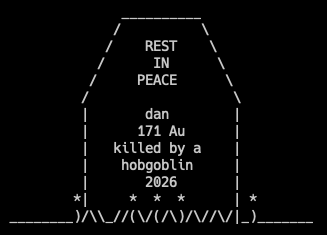
David Silva’s code repository for Rogue includes a nice README.md file that describes the structure of the project’s C source files. I won’t repeat it all here, but I will start traversing it in the order that I found useful.
Rogue has 33 C source files (.c), but only three C header files (.h). Nearly all of the declarations that allow functions in one C source file to call functions in other C source files are in a single giant header file, named rogue.h. It’s not that big a project and it probably worked fine for the original developers. Personally, I prefer to keep closer track of how modules depend on each other, and one header per module forces each source file to list all of its dependencies at the top of the file. When I was trying to understand Rogue’s display code to replace it with a MEGA65 alternative, I had to reorganize some of this.
The first order of business is to find the main() function, where the program begins. This entry point is in main.c. Without fully understanding what’s going on, we can get a sense that this routine sets up the game: it initializes global data structures, setting them up with the values they are expected to have at the beginning of the game. The main() function then calls the playit() function, also in this file, to play through all of the actual game.
When the game is over, main() exits the program entirely, back to the command prompt. For the MEGA65 version, it may be easier to return to a title screen and allow the player to start a new game right away, so the game doesn’t have to exit cleanly to the READY. prompt. It is quite charming that Unix Rogue forces the player to re-run the program to play again, one of many ways Rogue blurs the line between the player’s reality and the game’s fantasy.
The playit() function does some more initialization, then drives the turn-based game loop by calling the command() function repeatedly. When the effects of a turn end the game, the code sets the global variable playing to FALSE, which exits the loop.
  while (playing)
    command();
Why does the playit() function perform more initialization after main()? Why is it a separate function at all, instead of putting the command() loop directly into main()? playit() is actually called from two places in the code: right away from main(), or later after restoring a saved game from save.c in the restore() function. The player can restore a saved game during a turn, so calling playit() again resets a few things to continue the restored game.
Notably, this starts a new game loop inside the first one, as if the entire restored game is happening during a single turn of the previous game. Restoring a saved game results in a call stack where the main() function is waiting on the first playit() call to return, which is in turn waiting on the inner playit() call from restoring the game. As long as the player doesn’t restore too many times in a single play session, potentially overflowing the limited space for the call stack, this works itself out. Once the playing global variable is set to FALSE, every playit() game loop in the call stack exits, finally exiting the program from main(). It’s a cheap design, but it works well enough, especially considering that in Rogue, when you die, the program and its call stack die with you.
How Rogue uses memory
There are three ways that a C program uses memory:
- Global variables. Memory is reserved for the entire duration of the program at a fixed location, and can be accessed from any function.
- Local variables. When a function is called, the function’s local variables, including function arguments, are reserved for the duration of the function call. They typically live on the call stack, or may borrow registers for faster access if the compiler can determine it is safe to do so without changing the meaning of the program.
- Dynamic memory. At any point, the program can reserve (or allocate) an arbitrary amount of contiguous memory, whose size is determined during the run of the program. The program can also free (or deallocate) any previously reserved memory, making it available for future use. The C language runtime environment manages this process in an area of memory called the heap, and provides the
malloc()andfree()functions (and a few others) via the standard library.
Rogue uses dynamic memory directly in a few places. For example, memory is allocated whenever the player assigns a name to a discovered thing. Most of the program’s use of the heap happens in its display library, which we’ll discuss in a moment.
All other game state is managed in global variables. For example, the player’s hunger level is managed by the food_left global variable. This is initialized to the constant HUNGERTIME in the init_player() function. Most of the global state is declared in extern.h and defined in extern.c. The definitions provide some initialization, though all properties need to be initialized in functions anyway because they might be restored from a saved game during play.
Global variables are a challenging software pattern in general because they can cause confusion between modules that have to coordinate how and when the variables change. But they’re common in games, especially vintage ones running on small computers. Modern software patterns mitigate the complexities that global variables cause by spending large amounts of memory and CPU time on coordination, luxuries that small computers can’t afford, and many games don’t need.
There’s a fourth way that C programs use memory, referencing constant (unchanging, non-variable) data built into the program. Some of this, like messages in strings, is managed by C itself. For some constant data structures, Rogue just uses global variables, such as the monsters table that describes various aspects of how monsters behave. If we were writing it today, we’d use the const type specifier to tell both the programmer and the compiler that constant data shouldn’t change during the run of the program. But this feature wasn’t added to the C standard until 1989, years after Rogue was written, so naturally Rogue doesn’t use it, except in a couple of places that were added much later in Rogue’s lifetime.
#define ___ 1
#define XX 10
struct monster monsters[26] =
  {
/* Name   CARRY    FLAG   str, exp, lvl, amr, hpt, dmg */
{ "aquator",  0, ISMEAN, { XX,  20,   5,   2, ___, "0x0/0x0" } },
{ "bat",      0,  ISFLY, { XX,   1,   1,   3, ___, "1x2" } },
{ "centaur", 15,      0, { XX,  17,   4,   4, ___, "1x2/1x5/1x5" } },
// ...
  };
Daemons and fuses
The game loop takes a player action, attempts to perform the action within the game state, then makes other updates to the game state. The loop returns to the beginning, awaiting the next player input.
Rogue also manages game effects that happen over time. Within the code, these are known as daemons and fuses.
A daemon is an effect that takes place periodically. The game loop gives each daemon an opportunity to do something before the players turn or after the player’s turn. Daemon effects include moving monsters (runners), healing the player over time (doctor), making the player more hungry (stomach), and spawning new monsters at random moments (rollwand). There’s also a daemon that manages a special effect that changes the game’s appearance under special circumstances (visuals).
A fuse is simply a daemon that runs once, then quits. Fuses manage time-limited effects of potions and spells, and trigger the spawning of monsters under certain circumstances.
Rogue can create daemons and fuses dynamically as needed, but only needs a maximum number of them in a regular game. Instead of using dynamic memory, Rogue manages a pool of reserved data space in a table (d_list), then creates and deletes daemons (start_daemon) and fuses (fuse) in the table. The game loop iterates over the table, and performs the before and after actions for each active daemon and fuse as needed (do_daemons, do_fuses).
This is built as an abstraction to make daemons and fuses easy to implement. The program calls start_daemon with a pointer to a function that performs the duties of the daemon, along with information about the daemon’s frequency or duration. The daemon mechanism doesn’t know anything about what the function does, it just knows to call the function during certain turns through the loop. Similarly, the function doesn’t know anything about when it is being called, it just knows how to fulfill its purpose. For example, the doctor() function updates the player state in global variables (pstats) according to the game’s healing rules, and it just does this whenever it is called by the daemon system.
Here’s an excerpt of daemon.c showing how fuses are implemented, edited for space:
#define _X_ { EMPTY }

struct delayed_action d_list[MAXDAEMONS] = {
  _X_, _X_, _X_, _X_, _X_, _X_, _X_, _X_, _X_, _X_,
  _X_, _X_, _X_, _X_, _X_, _X_, _X_, _X_, _X_, _X_,
};

struct delayed_action *
d_slot()
{
  register struct delayed_action *dev;

  for (dev = d_list; dev <= &d_list[MAXDAEMONS-1]; dev++)
  if (dev->d_type == EMPTY)
    return dev;
  return NULL;
}

void
fuse(void (*func)(int), int arg, int time, int type)
{
  register struct delayed_action *wire;

  wire = d_slot();
  wire->d_type = type;
  wire->d_func = func;
  wire->d_arg = arg;
  wire->d_time = time;
}

void
do_fuses(int flag)
{
  register struct delayed_action *wire;

  for (wire = d_list; wire <= &d_list[MAXDAEMONS-1]; wire++)
  if (flag == wire->d_type && wire->d_time > 0 && --wire->d_time == 0)
  {
    wire->d_type = EMPTY;
    (*wire->d_func)(wire->d_arg);
  }
}
The game lights a fuse by calling fuse() with the function to call when the fuse runs out:
fuse(swander, 0, WANDERTIME, BEFORE);
The game loop calls do_daemons() and do_fuses() for the “before” phase and the “after” phase, shortening all fuses and calling fuse functions when their time is up:
  do_daemons(BEFORE);
  do_fuses(BEFORE);

  // ...

  do_daemons(AFTER);
  do_fuses(AFTER);
This causes the game loop to call swander(0); after WANDERTIME turns, before the last turn. (In this case, WANDERTIME is a macro that generates a random number between 56 and 84.)
Curses
There is much that is magical about Rogue. One major source of that magic is how the game manipulates the text display to draw the dungeon, player, monsters, objects, messages, and status line. This is all thanks to curses, an early system for building textual user interfaces. The variant ncurses is better known today and widely used. curses is the only software library used by Rogue that is not part of the C standard library, though curses is so common that some version of it is included with most Unix-compatible development environments.
Rogue uses curses for pretty much all of its display needs. One strategy for a MEGA65 version would be to make a MEGA65 version of the curses library. Add a MEGA65 version of the keyboard reading routine, and, in theory, everything else would just work. I spent some time teasing out which features of curses Rogue actually uses. Notably, Rogue does not use the ability for curses to treat windows as scrolling displays. The entire game is designed to fit in 80 x 24 frames.
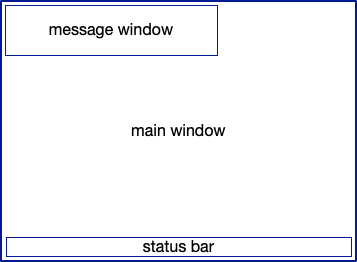
curses defines the display in terms of windows, overlapping rectangles of characters. Each window has its own cursor, and a program can use the cursor to print characters or strings. When multiple windows overlap, only the frontmost window is visible for a given screen location. curses manages the contents of the windows, and tries to optimize drawing the composite of all of the windows with the fewest terminal operations as possible. Optimization was especially important back when each operation was transmitted to the terminal over slow connections, such as 1200 baud modems over telephone wires. curses windows aren’t like a windowed operating system user interface: they aren’t draggable, and don’t have borders or close buttons. The program can add such features itself by drawing characters into the windows, but it has to manage them itself.
The set of functions provided by curses (the application programming interface or API) is fairly intuitive from this definition: initialize the main window (initscr), create and destroy windows (newwin, subwin, endwin), move windows (mvwin), draw at the cursor (waddch, waddstr), move the cursor (wmove), clear the screen and redraw windows (clear, wrefresh), and variants for combined moving and drawing, and for manipulating the main window. Several functions exist for accommodating terminal-specific features (raw, noecho, keypad, leaveok, getmaxx), which a Rogue-specific MEGA65 replacement can leave out.
I was impressed to see that Rogue uses curses to read characters from the screen as well (inch and variants, getyx). When the player wants to move in a direction, Rogue checks the screen directly to see if a wall character or a creature character are in the way. This is mostly surprising from the perspective of modern day, where a modern program might figure this out from a data structure that represents the entire dungeon, and update the display based on that data structure. In character-based games on computers with limited memory and CPU speed, it’s just easier for the screen itself to be the source of truth for that information. Any wall character on the screen, no matter how it got there, acts like a wall. Plenty of Commodore games do the same thing, especially in short games you find in magazines.
Rogue also reads characters from windows to save the game. With no other data structure representing the dungeon, or the portion of the current level known to the player, the best way to save the game is to take a screenshot. When the player restores the game, it loads the display back into the window. Save files contain much more information than this (see rs_restore_file in state.c), but this is the best way to remember the dungeon itself.
Rogue uses overlapping windows for a few purposes. The message area at the top might contain multiple lines of text, and this text might overlap the dungeon map. So the message area uses an overlapping window in these cases. curses remembers the main window underneath, so when the upper window closes, the display can be restored.
Needless to say, curses is a big deal for Rogue. Back in the day, Rogue was a big deal for curses, perhaps the most popular app to use the library.
Unix stuff we don’t need
There’s a lot of stuff in the original Rogue code specific to the Unix-like environment in which it expects to run. I won’t cover all of this in detail, but we can list a few things to watch out for that would simply be removed from a MEGA65 version:
- Signal handling. Unix programs have to know how to respond to incoming signals from the rest of the operating system, such as a request to shut down. The MEGA65 is a single-process operating system and has no such mechanism.
- Environment variables. All Unix commands run in an environment, and this environment can have variables set by the user or by other programs. Rogue has configurable settings—type o during a game to see what they are—that a user can pre-set using the
ROGUEOPTSenvironment variable. The MEGA65 game will need another way to save and restore settings, or just always start with defaults. - Process ID. A Unix program is assigned a process ID when it starts. By default, Rogue uses this, plus the current system clock, to seed the pseudo-random number generator. The MEGA65 has a Real Time Clock, but no process ID.
- Command line arguments. Unix commands can take arguments that control or parameterize their behavior. Rogue supports two optional arguments, one to display the high score table then quit, and another to generate a random death screen for the player then quit (populating an empty high score table). That’s cute, but the MEGA65 can’t send arguments to programs, and we don’t need these features. The Rogue command can also take the name of a save file to restore. The MEGA65 version will need to accommodate save files another way.
- Multi-user high score table. The high score table is stored in a shared location on a multi-user system, set up so only the Rogue program can modify it. Multiple users on the same system can see other top scores, and compete for the most gold. The MEGA65 version doesn’t need the Unix-specific logic to handle contention between multiple processes accessing the file at the same time.
- Multi-user resource management. Having every academic in the department playing Rogue at the same time may have overloaded the mainframe on occasion, so Rogue has features to check system load and deny access. This can even check system load while the game is running, and kick the player after a certain amount of time, or if the game process is left idling.
if (too_much())
{
  printf("Sorry, %s, but the system is too loaded now.\n", whoami);
  printf("Try again later.  Meanwhile, why not enjoy a%s %s?\n",
    vowelstr(fruit), fruit);
  if (author())
    printf("However, since you're a good guy, it's up to you\n");
  else
    exit(1);
}
We also don’t need any of the build automation and conditional compilation that supports building the game for multiple target platforms from the same code base. In theory, we could extend the Rogue code with similar logic for MEGA65-specific extensions, and then someone could use the ./configure script to decide whether to build the MEGA65 version or the Unix version or the macOS version or whatever, all from the same source code. In practice, the MEGA65 version will be drastically different, and, well, it’s not worth my time to make it a multi-platform source repository. I’ll be starting with the Calypsi C MEGA65 starter code and Makefile, and ditching everything out of the original code base that I don’t explicitly need for the MEGA65 version.
Wizard mode
There are a bunch of places throughout the Rogue code that use conditional compilation to include or exclude features based on preprocessor variables set in config.h or provided to the compiler by the build automation. One of the more interesting ones is MASTER. If this is set, then the compiler produces a version of Rogue with a special “wizard” mode. When built with this feature, Rogue begins by prompting you for a password. If you know the password, it enables “wizard” mode for the play session.
#ifdef MASTER
  /*
   * Check to see if he is a wizard
   */
  if (argc >= 2 && argv[1][0] == '\0')
  if (strcmp(PASSWD, md_crypt(md_getpass("wizard's password: "), "mT")) == 0)
  {
    wizard = TRUE;
    player.t_flags |= SEEMONST;
    argv++;
    argc--;
  }
#endif
Wizard mode is a debugging mode for Rogue. It allows the operator to set the random number generator seed (a “dungeon number”), so that random events become repeatable across runs for testing purposes. A wizard can inspect internal game state during play, and is shown more explicit messages about how actions affect the game. A wizard can also step out of wizard mode temporarily during the game, to see what a normal player would see.
It’s especially amusing to me that wizard mode is password protected. Rogue was originally a competitive sport on a multi-user system, and perhaps there was too much of a chance that a MASTER version might leak to the public. In its early days, the authors kept the C source code to themselves, and maybe there was a situation I’m not thinking of where it was important to have a Wizard mode on a public system that only the authors could access.
I might want to keep some debugging features to ensure the MEGA65 version works as intended. But I can drop the code involved in encrypting the password.
The beginnings of a MEGA65 version
Based on a cursory code review, it looks like the fastest way to get Rogue running on the MEGA65 could involve the following steps:
- Replace Curses with a MEGA65-specific work-alike, supporting the subset of features used by Rogue.
- Drop Unix-specific integrations and features.
- Drop Unix-specific build automations, taking care to keep the output of code generation steps.
- Simplify or temporarily remove disk-based operations. The Calypsi implementation of the C standard library can probably handle it, but less rigamarole is needed on a single-user microcomputer.
I was able to get a simple curses-like windowing system going pretty quickly, leaving out features like scrolling and display update optimization. The original code made some assumptions about the size of the int type being larger than Calypsi, so I had to make some judgement calls about whether it actually needed long values or was just using int for convenience. Some work was done on the original to put as much platform-specific code into just a couple of files, and I tried to drop those files entirely, either by offering MEGA65 equivalents in higher-level functions or just disabling features.
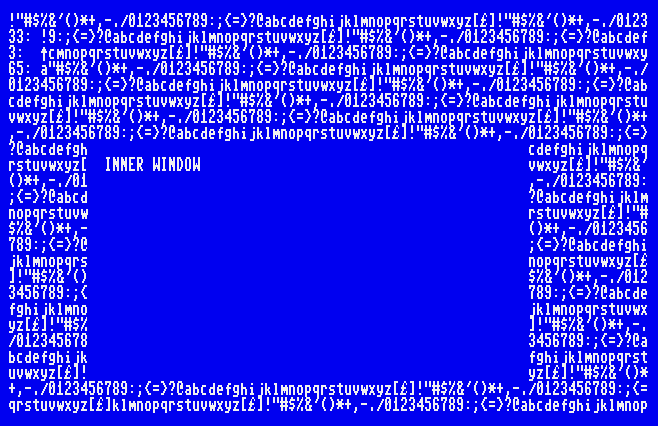
After a bunch of building and fixing and building and fixing, I got every source file to compile, using this new library instead of Unix curses.
The Calypsi compiler built a bunch of object files, but the Calypsi linker took one look at them and refused to build a PRG file! As we saw last Digest, the default linker configuration from the file mega65-plain.scm is capable of building a program up to 31 KB in size. According to the linker, my version of Rogue needs 112 KB of memory.
The MEGA65 has 384 KB of RAM (not counting its 8 MB of Attic RAM), so there are some possibilities. But I will need to dig deeper into Calypsi’s feature set, so I can tell it exactly how to use the MEGA65’s memory architecture. Each program needs to make its own decisions about accessing memory and working with (or around) the KERNAL, so Calypsi can’t do this automatically. There may be ways to reduce the memory footprint as well.
I’ll also need to consider a boot loader strategy. The default Calypsi configuration accommodates a program up to 31 KB in size, reserving 8 KB for the heap. The DLOAD command could load a runnable PRG file into memory up to 39 KB, at which point the data would collide with the KERNAL if it went any further. To load a larger program, I need a small program that loads the rest of the program according to my needs. In particular, I will need to load code and data into discontiguous regions of memory, so I don’t collide with the KERNAL code and variables related to disk handling—the code that’s loading the program in the first place.
Until next time…
Will I manage to get Rogue working on the MEGA65? Tune in next time to find out!
Boy it sure would be a shame if the Digest got canceled before the next issue. Better support the Digest! Visit ko-fi.com/dddaaannn to find out how.
Same Bat time, same Bat channel!
— Dan