
Calypsi C, part 2: Using memory
Calypsi C, part 2: Using memory. Dan’s MEGA65 Digest for July 2026.

The story so far: Back in May, we introduced the Calypsi C cross-compiler, a highly capable optimizing compiler toolchain for multiple vintage and retro computers, including the MEGA65. Calypsi’s default linker configuration works well for pure C programs that compile to a single MEGA65 PRG file, a fine starting point for learning the language and writing small- to medium-sized programs.
Then last month we discovered a vintage Unix text game, written in C and based on the curses terminal display library: Rogue: Exploring the Dungeons of Doom. I got the idea in my head that given how portable C can be on a good day, it might be possible to use the original source code for Rogue to make a faithful version for the MEGA65. I would just need to replace the curses display library with a MEGA65 equivalent, and everything would just work, right?
Without further changes, I ended up with a program that Calypsi tried—and failed—to build into a single PRG file 112 KB in size. While the MEGA65 has enough memory for that much code and data, its memory architecture and KERNAL don’t support a single PRG file that large. I will need to use advanced memory management, coding, and boot loader techniques, along with some powerful features of Calypsi, to produce a MEGA65 program that will load and run this much code and data.
I owe most of this article to kibo and his work on the MEGASPUTM graphic adventure game player, which is built in Calypsi, uses many of these techniques, and serves as a useful code example for large MEGA65 projects in the C language. The final solution uses a combination of multiple techniques, each of which are worth knowing about so you can apply them selectively to your own projects.
Amiga 500 core, in progress
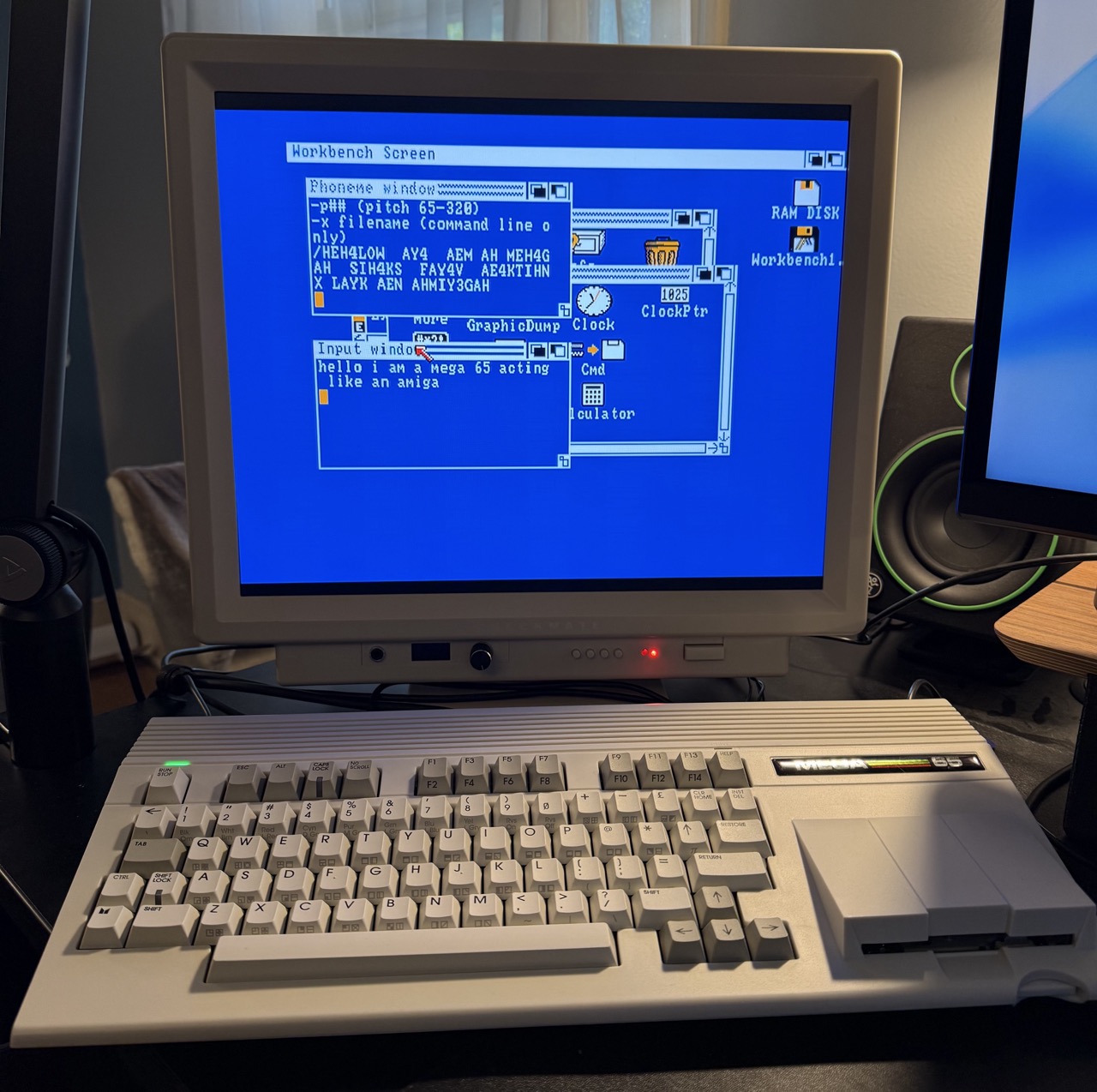
Amiga 500 core for the MEGA65, by sy2002.
The MEGA65 gets its first Amiga core!
sy2002, of the C64 core project, has launched an FPGA core that recreates an Amiga 500. This early version is feature complete, and supports the OCS chipset and PAL video output, with 512 KB of Chip RAM and 512 KB Slow RAM. Connect an Amiga mouse (or mouSTer or Tank Mouse) to port 1, and a joystick to port 2. Disk support is currently limited to 880 KB ADF disk images on the SD card, in a single df0: virtual drive. It loads Kickstart and Workbench from disk images, and can run demos and games. Yes, including Lemmings.
You will need to acquire files for Kickstart 1.3 revision 34.5, Workbench 1.3 ADFs, and any other ADF disks you might want to run. Put the Kickstart ROM on the SD card as: /amiga/kick.rom
The author has clarified that this was largely an AI-assisted port of MiniMig that he won’t have time to maintain. This version will likely inform an active sibling project that will carry it forward. Head to the announcement post to download it, and don’t miss the project’s documentation website. I know lots of people who have been waiting for this milestone for the MEGA65 project, and I can’t wait to see what develops.
Commodore 128 core, in progress
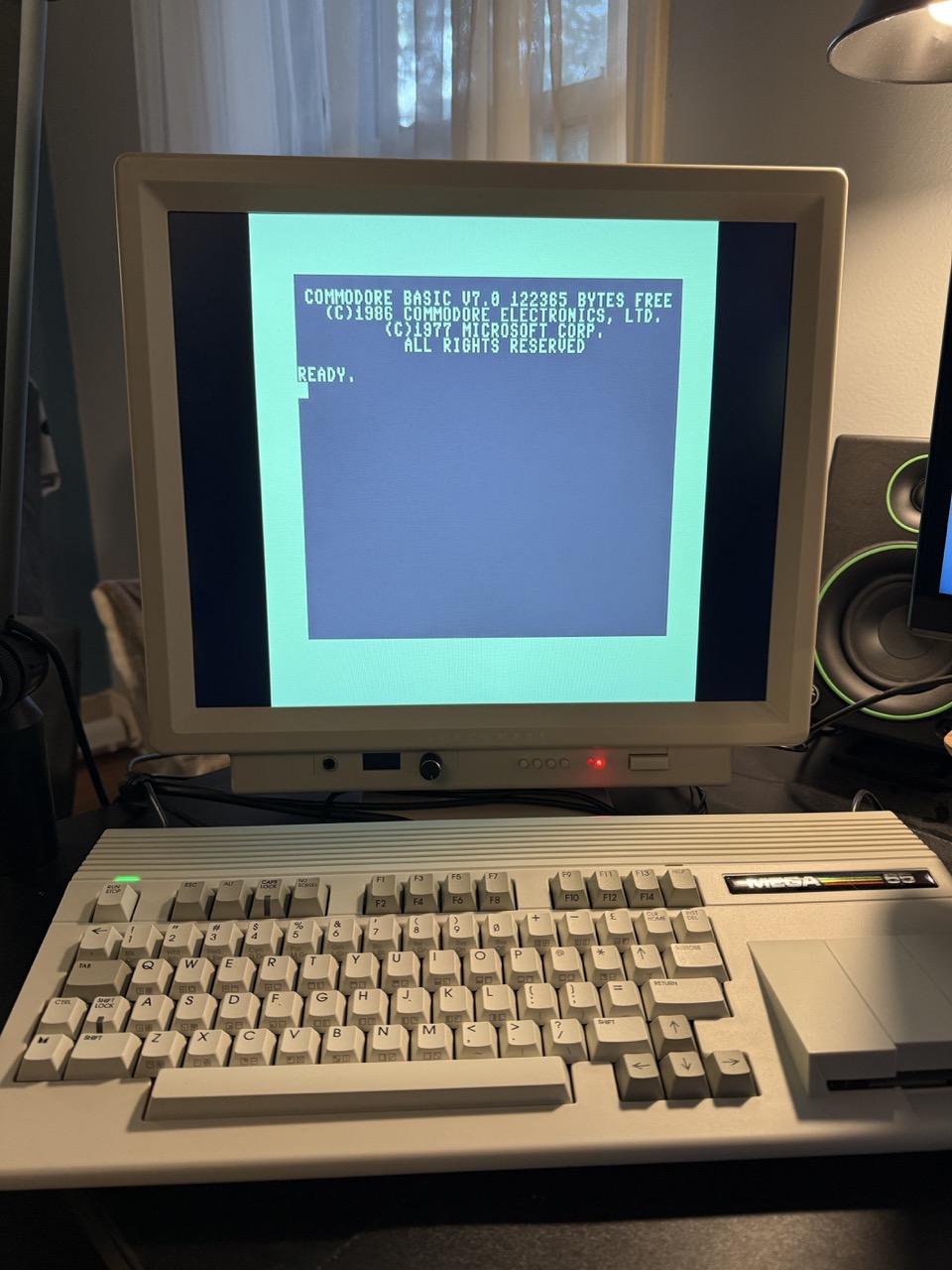
Commodore 128 core for the MEGA65, by Stefan Eilers.
Meanwhile, Stefan Eilers has a Commodore 128 core in progress, with an early release for people to try. So far only 40-column mode and IEC disk drives are supported. It does not yet support cartridges, 80-column mode, or virtual disk images off the SD card. But there’s meaningful progress, and you can play with it!
You will need C128 ROMs for this one as well. The 72 KB system ROM bundle is to be installed as: /c128/boot0.rom The 512 KB drive ROM is: /c128/boot1.rom Check out the Github repo for the project for more information.
More MiSTer2MEGA documentation
sy2002 has also extended The Ultimate MiSTer2MEGA Porting Guide with a supplement on the QNICE CPU and the shell ROM that provides the pop-up menus. If you’re interested in porting MiSTer cores, be sure to keep track of these useful updates.
Goals
If I were making a game for the Commodore 64 that required 112 KB of code and data, I’d have no choice but to build it in a way that loaded pieces from disk at moments during play, keeping only a small portion in the C64’s 64 KB of memory at a time. The MEGA65 has 384 KB of main memory, so I should be able to get Rogue to run entirely from memory after it is loaded the first time, using the disk only to save and restore the game state at the request of the player, and perhaps to save a high score table to disk at the end of each game.
The DLOAD command can only load a PRG file into a single contiguous region of memory in bank 0, and will refuse to load a PRG file larger than 53 KB. I will need to write my own custom program, known as a boot loader, that loads discontiguous chunks of the game’s code and data into banks 0 and 1. The user will load and run the boot loader program to start the game.
This requires splitting the game code and data into chunks. The default Calypsi linker configuration only knows how to build a single PRG file of 32 KB, but it is possible to give the linker more specific instructions to fit the target architecture. I will need to configure the Calypsi linker to organize the program according to my desired memory map.
I will also need to tell the Calypsi compiler how to access code and data across banks 0 and 1, once the linker has placed it there. The compiler doesn’t do this automatically: it doesn’t know anything about what the linker will do. I’ll need to be explicit about how I want the machine code that Calypsi generates to use the MEGA65 memory system, according to the needs of the program.
Lastly, I want to fit the entire program into banks 0 and 1. Technically that’s 128 KB of space, but that has to include zero page registers, the CPU stack, and dynamic memory allocation space. While the program is loading from disk, the KERNAL will be using disk system memory at the beginning of bank 1, so I can’t just load data directly into that space. In theory, I can hide the KERNAL while I’m not using it, but it would be easiest if I could just keep it in memory. Overall, there’s something between 24 KB and 32 KB of the first two banks that I cannot use for program code and data.
So I will have to reduce the size of the game. Some of this will just be a bit of belt tightening. I may be able to reduce the game’s reliance on the C standard library, so I’m pulling in less of its code. Worst case scenario, I’ll just need to use more banks. My target, for now, is to use only banks 0 and 1.
Why only 32 KB?
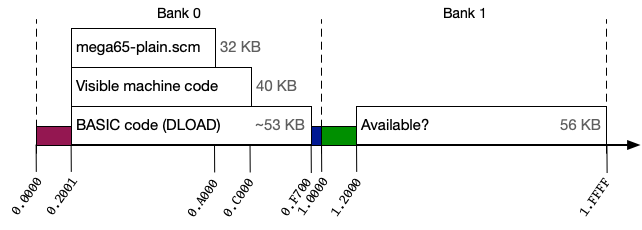
32 KB doesn’t seem like much. Why is Calypsi’s default maximum PRG size so small?
When you type the command DLOAD "SOMEFILE", the MEGA65 loads the complete contents of the file into memory starting at address $2001. It is universally expected that the beginning of this data is a BASIC program that can be RUN. You can combine the DLOAD and RUN commands by simply giving RUN the filename: RUN "SOMEFILE"
The file can contain other information beyond the BASIC program. DLOAD just paints all of the data from the file into RAM, and doesn’t care what it is. We take advantage of this to make runnable programs in machine code, such as assembled from assembly language or compiled from a language like C. The start of the PRG file is a short BASIC program that invokes the machine code that appears after the BASIC program in the file. This is what Calypsi produces when you ask it to build a PRG file with the --output-format=prg linker argument.
DLOAD loads the program into MEGA65 RAM in bank 0. The next reserved region in RAM starts at address $F700, where BASIC keeps some of its variable storage. DLOAD will refuse to load a PRG larger than $F700 - $2001 = $D6FF bytes, or 55,039 bytes, about 53 KB. This is the largest possible size of a program written in pure BASIC: the tokenized BASIC code cannot go beyond that address.
When machine code is involved, we have to take the rest of the MEGA65’s memory system into account, especially how the CPU locates machine code instructions. We’ve covered a few of these concepts in previous Digests, but it’s important enough to review.
The MEGA65 memory system has 2^28 = 268,435,456 possible addresses, a 28-bit address space. Some of these addresses are connected to memory, others are connected to peripherals such as the VIC video chip, and most aren’t connected to anything (reserved for future expansion). The 45GS02 CPU has ways it can access any of these addresses, using four bytes to store the address and leaving the top four bits set to zero.
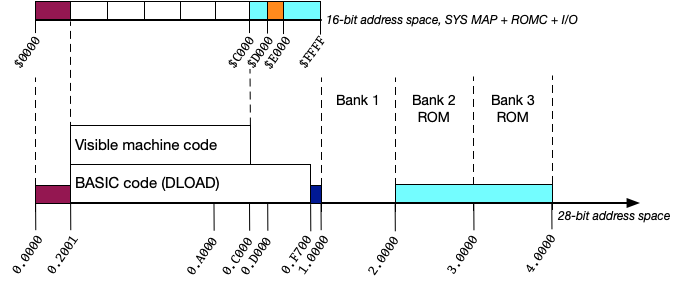
For backwards compatibility with the MOS 6502 lineage of CPUs, most 45GS02 CPU features expect the addresses of things to only be two bytes = 16 bits. In particular, the program counter, which keeps track of the address of the next instruction to execute, is only 16 bits wide. It’d be a shame if these features could only access the first 2^16 = 65,536 addresses of memory. So, instead, the memory system maintains a 16-bit address space that assigns regions of 16-bit addresses to regions of 28-bit addresses. These assignments can be changed by the program as needed.
When the KERNAL is active, it uses a 16-bit memory map that puts KERNAL code at 16-bit addresses $C000-$CFFF, hardware registers at $D000-$DFFF, and more KERNAL code at $E000-$FFFF. KERNAL code actually lives in upper regions of the 28-bit address space, within 28-bit addresses $002.0000 to $003.FFFF (banks 2 and 3). There is still RAM at 28-bit addresses $000.C000 to $000.FFFF, but the KERNAL sets the memory system so 16-bit addresses $C000 to $FFFF refer to the KERNAL code and I/O registers. The RAM is shadowed in the 16-bit address space by the KERNAL’s memory settings. This is how the DLOAD command can load a 53 KB PRG file into the RAM, underneath the KERNAL code visible at those 16-bit addresses.
This establishes a practical size limit on machine code in a PRG file loaded by the DLOAD command. Without changing the memory settings, the CPU can only see machine code from the PRG file up to address $BFFF. $BFFF - $2001 = $9FFE, or 40,958 bytes, or about 40 KB.
It’s entirely reasonable for a program to execute machine code that changes memory settings before accessing code at higher 16-bit addresses. If we were writing an assembly language program, this would be straightforward, because we have complete control over where the entry point of the program is in memory. When writing a C program, we delegate that decision to the linker. We’d need a way to tell the linker to put certain things in certain places if we want more control.
But wait, why did I say 32 KB earlier if we have 40 KB? That’s one last detail. Calypsi’s default linker configuration keeps everything in a single region of 32 KB, from 16-bit addresses $2001 to $9FFF. This leaves $A000-$BFFF (8 KB) unassigned.
Setting custom linker configuration
When we first started with Calypsi, I said the mega65-plain.scm configuration file is included with Calypsi, and it’s for simple programs. Here are the complete contents of this file:
(define memories
'((memory program
          (address (#x2001 . #x9fff))
          (type any)
          (section (programStart #x2001) (startup #x200e)))
  (memory zeroPage
          (address (#x2 . #x7f))
          (type ram)
          (qualifier zpage)
          (section (registers #x2)))
  (memory stackPage
          (address (#x100 . #x1ff))
          (type ram))
  (memory freeSpace
          (address (#x1600 . #x1eff))
          (section zpsave))
  ))
Without understanding the syntax of this file, you can see where it sets the 32 KB limit. We could change #x9fff to #xbfff to extend the maximum PRG size to 40 KB.
This file uses the Scheme programming language to define a data structure named memories. You don’t need to know much about Scheme except that all the parentheses need to match, and the little single-quote mark in the 2nd line is important. All of the important settings are within the second set of parentheses.
In this case, the configuration file defines a set of memory entries. Each one has a name, such as program or zeroPage, and some properties in their own sets of parentheses.
From top to bottom, mega65-plain.scm defines four regions of MEGA65 memory and declares their purpose, like so:
program: In the address range $2001 to $9FFF, the linker can use this memory for any purpose. It must use the beginning of the region (address $2001) for the start of the program. Calypsi generates a BASIC PRG preamble that invokes theSYScommand with address $200E, which is just enough space for the preamble.zeroPage: In the address range $0002 to $007F, there exists RAM that Calypsi will recognize as the “zero page” (the 45GS02 base page) and use as register space. It stops at $007F to preserve the KERNAL variables in the upper half of the zero page. A program that completely shuts off the KERNAL could change this configuration to dedicate more of the zero page to program registers.stackPage: The 45GS02 CPU stack is in the address range $0100 to $01FF, by default.freeSpace: Memory in the range $1600 to $1EFF is available for programs to use. In this case, it is configured as a place to stash the initial zero page contents when using the#pragma require __preserve_zpdirective we saw in a previous Digest.
This tells Calypsi that it has 32 KB of space in which to place code, data, and variables, all in bank 0. If the linker runs out of space before it has placed everything, it aborts the process and reports an error.
To provide Calypsi with a custom configuration file, create a file similar to mega65-plain.scm in your project, and give it a name that starts with mega65- and ends with .scm. Provide the file path to the linker command line instead of mega65-plain.scm, such as in your Makefile.
ln6502 --target=mega65 mega65-crogue.scm -o crogue.prg --output-format=prg ...
You can set up the Makefile rule to re-build the project after making changes to the linker configuration file like so:
$(PROGNAME).prg: $(OBJS) mega65-crogue.scm
  $(LN6502) --target=mega65 mega65-crogue.scm --output-format=prg -o $@ $(filter-out mega65-crogue.scm,$^)
Calypsi memory concepts
Let’s take a moment to clarify Calypsi’s memory configuration terminology.
- Memory. A region of contiguous memory declared for a particular purpose in the linker configuration, with certain attributes. Example:
program, as defined inmega65-plain.scm. - Section. A way that memory is used, with an internal name used by the compiler and linker. Example:
coderepresents memory that contains machine code. - Fragment. A piece of memory usage that belongs to a section, and is placed into a memory by the linker. Fragments are generated by the compiler. For example, each function in C source code becomes a fragment in a
codesection. - Type. The fundamental usage type of a memory. A section can be bound directly to a specific memory, or can be associated with any memory of a corresponding type. A memory whose
typeisanyallows the linker to decide how to best use the memory. Example: thetexttype refers to executable code. - Placement group. A subdivision of a memory, to allow for assigning multiple types in a single address range.
Recall that the compiler takes a C source file and produces an object file. The object file defines fragments that belong to sections. The linker takes all of the object files for the project and tries to place fragments into memory locations based on the linker configuration. For example, code sections would all be placed in a memory configured to accept code.
A few useful section types to know about:
code: The executable machine code.data: Initialized data, such as global variables assigned a definition with their declaration.zdata: Uninitialized data, which can be set to zero at the beginning of the program.cdata: Constant data, such as string constants.
Calypsi can generate a report of all of the linker’s decisions. This is a really handy way to make sure your linker configuration is doing the right thing. Back in May, we saw that the MEGA65 starter project is already set up to generate this report, as the file hello-mega65.lst. The --list-file argument to the linker tells it to produce this file.
Here’s a brief excerpt of the report from a short sample program I wrote. The mega65-plain.scm configuration defined these memories:
Name               Range             Size     Used     Checksum  Largest unallocated
------------------------------------------------------------------------------------
zeroPage           00000002-0000007f 0000007e  44.4%   none      00000046
stackPage          00000100-000001ff 00000100   0.0%   none      00000100
freeSpace          00001600-00001eff 00000900   0.0%   none      00000900
program            00002001-00009fff 00007fff  27.7%   none      none
  > program-nobits 000032ff-00004380 00001082 100.0%   none      00005c7f
Calypsi assigned the sections of my program to memories like so:
Name            Range              Size     Memory         Fragments
--------------------------------------------------------------------
registers       00000002-00000039  00000038 zeroPage       1
programStart    00002001-0000200d  0000000d program        1
startup         0000200e-0000203e  00000031 program        5
cdata           0000203f-0000204d  0000000f program        2
data_init_table 0000204e-00002057  0000000a program        1
cdata           00002058-00002067  00000010 program        1
switch          00002068-0000207f  00000018 program        1
code            00002080-000032fe  0000127f program        71
zdata           000032ff-00003380  00000082 program-nobits 11
cstack          00003381-00004380  00001000 program-nobits 1
For a complete list of sections and their types, see the Calypsi manual chapter 6.1: “Sections.”
Configuring heap memory
A C program can allocate an arbitrary amount of memory determined while the program is running using a built-in memory management system known as the heap. Here’s a trivial example:
#include <stdio.h>
#include <stdlib.h>
#include <string.h>

#define BUF_SIZE 256

void main () {
  char *buf = malloc(BUF_SIZE);
  if (buf == NULL) {
    puts("out of memory\n");
    return;
  }

  // Trivial example of using the buffer.
  strncpy(buf, "hello\n", 7);
  printf("%s", buf);

  free(buf);
}
If you build this program with the default mega65-plain.scm, compilation and linking will succeed, and the program will run, but it will report “OUT OF MEMORY” then quit. This is because the default linker configuration does not assign any memory to the heap. To fix this, add the following definitions to the project’s custom linker configuration file:
    (block heap (size #x2000))
    (memory bss_main_lo (address (#xa000 . #xbfff))
      (section
        (heap #xa000)
      ))
The block rule defines a chunk of heap memory for the linker to assign. Most blocks come from the object files of the program, but blocks for the heap and stack need to be defined explicitly. The memory named bss_main_lo assigns the heap to an explicit 8 KB region of memory at addresses $A000 to $BFFF.
Try setting up the MEGA65 starter project with this configuration, and see how it changes the report in hello-mega65.lst.
Important: Calypsi only knows how to use 16-bit addresses when allocating dynamic memory. While you can manipulate the memory system settings to map these addresses to upper banks, it’s easiest to assume that heap will use RAM in bank 0, and keep its 28-bit addresses un-shadowed when messing with the memory system.
Far pointers
We have seen how to access specific addresses in bank 0 using pointers. This allowed us to access registers in the $d000-$dfff range by casting the numerical address to a pointer type, then dereferencing the pointer, like so:
*((volatile uint8_t *)0xd020) = 7;
A pointer such as this one refers to the 16-bit address space. The pointer data is 16 bits, and Calypsi uses the CPU’s 16-bit access mode in the code that it generates.
For example, if screen memory is in bank 0, you can use a 16-bit pointer to access it, reading the start address out of the SCRNPTR register. The following code reads the location of screen memory from the lowest two bytes of SCRNPTR as a 16-bit unsigned integer, then treats it as a pointer to a byte:
uint8_t *scrnptr = (uint8_t *) (*((uint16_t *)0xd060));

for (int i = 0; i < 2000; i++) {
  *(scrnptr + i) = 32;
}
We’ve seen that there are several ways to access color memory, including a way to use registers starting at $D800 as a window into the first 1 KB of color memory, or 2 KB while manipulating the CRAM2K register. (For a full explanation, see “Colour Memory” in the MEGA65 Compendium.) It’s often easiest to access color memory at its physical location at address $FF8.0000. In machine code, you could use 32-bit indirect addressing to get at these addresses. Calypsi can also do this, but it needs to be told explicitly to use a 32-bit pointer.
The solution is to use what’s known as a far pointer. It looks like this:
uint8_t __far *colormem = 0xff80000;

for (int i = 0; i < 2000; i++) {
  *(colormem + i) = 1;
}
The __far qualifier is part of the pointer’s type, and makes the type distinct from a regular non-far pointer. A far pointer’s data is 32 bits, and Calypsi uses the CPU’s 32-bit access mode in the code that it generates. This typically requires more machine code instructions and some space in zero page, so it takes more CPU cycles and is more difficult for Calypsi to optimize.
Calypsi far pointers can refer to any address, but for efficiency purposes, pointer arithmetic (such as adding an index i, as above) is not allowed to leave the bank. If you need to cross banks, Calypsi also has a huge pointer (__huge) that doesn’t have this restriction, at the expense of needing more machine code.
There’s currently a bug in Calypsi’s parser where __far and __huge aren’t recognized everywhere they’re supposed to be recognized. The workaround is to use the longer phrase, __attribute__((far)), which works everywhere.
The __far keyword is specific to Calypsi. This can be confusing to code editors with support for C language error detection. I’m using VSCode and its C language mode to verify my code as I type, and it doesn’t recognize __far like this. You can tell VSCode to ignore __far by putting the following in the project’s settings.json file, nestled appropriately with other values that might already be in there:
{
  "C_Cpp.default.defines": [
    "__far="
  ]
}
Far variables
You can tell Calypsi to place a global variable into the MEGA65’s upper memory. To do this, use the __far or __huge qualifier with the variable type.
uint8_t __far player_score;
This has two effects:
- The compiler requires the
__faror__hugequalifier on pointers that refer to the variable. - The compiler adds the variable to a section of type
farorhugeif it is initialized, orzfarorzhugeif it is not initialized.
The linker attempts to place these sections in appropriate memory based on the linker configuration. If no memory is defined to hold far data (as is the case in mega65-plain.scm), the linker aborts with an error.
The following configuration declares addressees $1.2000 to $1.3FFF as reserved for far memory:
  (memory bank1_far
    (address (#x12000 . #x13fff))
    (type data)
    (qualifier far))
Setting up far memory and using it for variables gives Calypsi permission to spread out your data storage. But remember that it comes at the expense of slower access and more code generated. Every use of a far variable, or dereferencing a far pointer, requires 32-bit indirect addressing, which involves storing an address in zero page and invoking the addressing mode.
Reducing printf()
In the previous Digest, I mentioned that using C standard library functions can drag a lot of code into your project. While printf() is powerful for formatting output in complex ways with very little calling code, it comes at the cost of a big chunk of library code to support all of its formatting features.
This short program uses printf() with one of its most expensive formatting features, rendering floating point numbers:
#include <stdio.h>

void main () {
  printf("example: %f\n", 22.0/7.0);
  return;
}
This produces a PRG of 10,983 bytes. That’s quite a lot for a single function call.
Calypsi has a cool trick to help with this. Calypsi actually has several versions of printf() it can choose to include, each with an increasing selection of supported formatting features. The compiler reviews all uses of printf() (and related functions) in your program, and selects the leanest version of the string formatting engine that supports all of the features the program needs.
In the previous example, I forced Calypsi to use the beefiest version of printf() by formatting a floating point number (%f). If I change the printf() call to only use integer formatting:
printf("example: %d\n", 22 + 7);
I get a PRG of 4,860 bytes. That’s a big improvement, and I still have many useful formatting features I can use with this version.
While looking over how Rogue uses printf(), I thought maybe I could save a few more bytes by writing my own version, with even fewer features. Perhaps it was foolhardy to try to write my own version of the most famous standard library function of all time, but I got a positive result. By limiting it to just %d, %s, %c, and %%, I managed to write a smaller printf() that brought this test program down to 3,708 bytes.
If absolutely no string formatting is needed, the program is better off using puts() instead of printf():
puts("example\n");
This compiles to 2,761 bytes.
Calypsi chooses the printf() implementation automatically based on how your code uses it. If for some reason you want to force it to use a specific version, you can pass a command line argument to the linker, such as --rtattr printf=nofloat. For a complete description, see the Calypsi manual, chapter 18.6: “Library on a diet.”
Reducing exit()
While on this topic, Calpysi can also save a few bytes if your program never exits. Many Commodore programs never bother to exit to the READY prompt because users don’t need it. When the user is finished with the program, they simply reset the computer.
Calypsi normally attaches a chunk of clean-up code in case the program returns from the main() function, or calls the exit() function. If your program doesn’t need this exit code, it can request that it be omitted, with a linker argument: --rtattr exit=simplified
ln6502 --target=mega65 mega65-crogue.scm ... --rtattr exit=simplified
I saw a savings of 87 bytes when I did this with this test program. Not much, but I’ll take all the help I can get.
Reducing Rogue
If I were writing this game from scratch, I would try to get something working within the default 32 KB, and only start mixing in advanced techniques with a working application. The responsible thing to do with this port would be to cut out entire features—potions, scrolls, even monsters—down to this size, then start making decisions so I can add stuff back in. I’m not going to go quite this far, but I do want to see how much space I’ll actually need to get the game going.
I started by stripping out all of the Unix-specific stuff I mentioned last month. I simplified main.c extensively, having the program enter an infinite loop instead of exiting. I kept wizard mode disabled in the build, and deleted code related to encrypting the wizard password. Nearly all screen manipulation was happening in calls to my curses alternative, so I was able to clean up or replace calls to writing to the Unix standard output stream (printf, fflush, etc.). My custom printf implementation is now just a limited sprintf(), which performs string formatting into string memory. This gets written to the screen with my curses library.
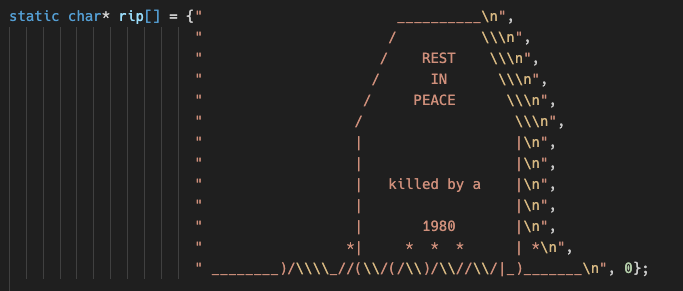
A big space hog turned out to be rip.c, which handles all of the game ending logic and exiting the program. When you die, this code prints a large ASCII art tombstone with your name on it, and implements this as a collection of large strings stored in program memory (cdata). The tombstone is charming and I’ll want to replace it, but removing the inline strings for the art saved 482 bytes alone. There’s a similar ASCII art mural for the unlikely event when you win the game, which I also removed temporarily. I might replace these with separate files loaded from disk as needed, or load them separately into bank 4, instead of keeping them in program memory during the game. I also disabled the high score file for now.
According to the linker, my changes brought the program down to $c9ef of code and $185d of data, with $1000 reserved for cstack and $69a4 of zdata, for a total size of $15bf0, or about 86 KB.
Designing a memory map
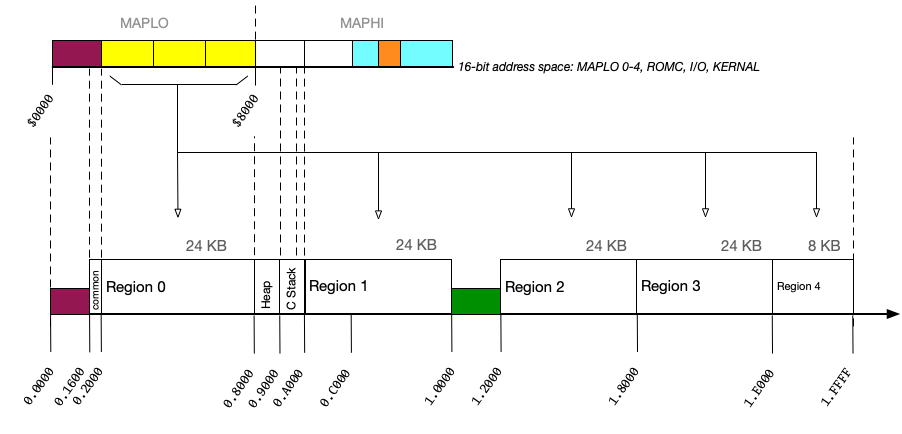
My goal for now is to get a version of Rogue working that keeps the MEGA65 KERNAL in memory. This gives me the following restrictions, around which I can plan a memory map:
- Zero page. $0002-$008F are available for Calypsi to use for fast variables, similar to CPU registers. $0090-$00FC are used by the KERNAL for various purposes.
- CPU stack. $0100-$01FF is the default location of the CPU stack. Calypsi uses machine code instructions for calling subroutines, and may use the CPU stack for data. Calypsi also maintains a separate “C stack” for function arguments and such, located elsewhere.
- MAP register. The CPU MAP register determines how the 16-bit address space maps to the 28-bit address space, in 8 KB chunks. The KERNAL needs $0000-$1FFF (8 KB) to stay “un-mapped,” referring to physical RAM in bank 0. It also needs $E000-$FFFF (8 KB) to map to the KERNAL’s own machine code in bank 3.
- ROMC and I/O. The KERNAL expects $C000-$CFFF to refer to additional KERNAL code, selected with the ROMC register bit $D030.5. It also expects I/O registers (VIC-IV, SID, etc.) at $D000-$DFFF, selected with the C64-style banking register bits $0001.0-1. The MAP register leaves the 8 KB region $C000-$DFFF “un-mapped” so that these other banking mechanisms maintain control of those pages.
- Disk variables. When the KERNAL is accessing a D81 disk image or the internal floppy drive, it needs additional variable space in bank 1, at 1.0000-1.1FFF. I won’t be accessing the disk often, but it’s easiest to just assume that memory is reserved for the entire duration of the program.
Recall that the MAP register specifies which 8 KB regions are “mapped” or “un-mapped,” and applies an offset to the mapped regions to translate its 16-bit address to a 28-bit address. Also recall that the first four regions must share a single offset setting (MAPLO), as must the last four regions (MAPHI). To keep the KERNAL code mapped at $E000-$FFFF, the MAPHI offset must be $3.0000, which effectively rules out any custom mapping of $8000-$BFFF. If we set any of those regions to “mapped,” they’d use a +$3.0000 offset, which isn’t useful. So $8000-$BFFF stay un-mapped, and refer to memory in bank 0. This is a good place to put the heap.
$0000-$1FFF needs to refer to bank 0 memory, so we can’t set that region to “mapped,” at least not with a non-zero offset. But I can leave it un-mapped, and use the rest of $2000-$7FFF (24 KB) as a MAP window to access upper memory. To do so, I would set MAPLO with an offset that gets added to the 16-bit address to form the 28-bit address. This doesn’t have to be memory in upper banks! It can also refer to other addresses in bank 0, to access the RAM being shadowed by the KERNAL ROM and banking mechanisms at $C000-$FFFF.
My first guess at a memory strategy is to reserve parts of physical RAM in banks 0 and 1 as described, assign the heap at $0.8000, then divvy up the rest into 24 KB regions that I can access using MAPLO and 16-bit addresses $2000-$7FFF. I get four full 24 KB regions, plus another 8 KB at the end of bank 1 that I can either use the same way, or come up with a special purpose for later. The 28-bit addresses for these regions are 0.2000, 0.A000, 1.2000, 1.8000, and the little one at 1.E000. If I really want to use that little one at the end, I’ll need to account for the color memory window at 1.F800-1.FFFF, such as by pushing COLPTR ahead by 2 KB.
In theory, that’s 104 KB I can use for both code and data. In practice, I can only use 24 KB at a time. I will need to do the following:
- Organize the Rogue code and its corresponding data into self-contained 24 KB regions. Tell the linker which code goes in which region.
- Tell the linker to treat each region as if it starts at 16-bit address $2000.
- Tell the linker to produce a separate file for each region that can be loaded into memory.
- Write a boot loader program that loads each region into its final location.
- Add code to move the MAPLO window when code in one region wants to call code in another region.
We’ll cover the first four steps in the rest of this article. We’ll save step 5 for next month, so we can take our time to enjoy it.
Configuring sections
Recall that our linker configuration (mega65-crogue.scm) defines a memory named program at addresses $2001-$9FFF, of type any, with some additional parameters to set it up like a runnable program.
  (memory program
    (address (#x2001 . #x9fff))
    (type any)
    (section (programStart #x2001) (startup #x200e)))
With this configuration, the linker will try to fill this memory with code and data fragments, and also set the startup routine to call main(), wherever it ends up.
For Rogue, I want to declare memory for each of my regions, then assign code and data to specific regions. Here is a complete linker configuration for Region 1:
  (memory crogue-r1-region
    (address (#x2000 . #x7fff))
    (scatter-to r1)
    (placement-group r1-bits
      (section
        r1Text
        r1Data
        r1Rodata))
    (placement-group r1-nobits
      (section
        r1Bss)))
  (memory crogue-r1
    (address (#x0a000 . #x0ffff))
    (section r1))
The first memory, crogue-r1-region, declares sections where the linker will place fragments. It sets the 16-bit address range that the linker will use when sewing together branch instructions and data references within the memory. Each type of memory needs its own section, so the linker can group stuff together by type.
When inventing section names, use camelCase or underscore_case. Some parts of Calypsi do not support section names containing hyphens.
These sections are organized into two placement groups: one for sections that will contain information (the “bits” placement group) and one for the section that will contain uninitialized memory (the “nobits” placement group). Uninitialized memory is filled with zeroes by the start-up code that Calypsi adds to the program. As such, it doesn’t need to be saved to disk the way code and initialized memory is. “BSS” stands for “Block Started by Symbol,” which is the term of art for this type in object files. The “nobits” placement group must come after the “bits” placement group, so the file on disk can simply end just before the “nobits” begins.
The second memory, crogue-r1, declares how the sections of the first memory are actually stored in the 28-bit address space. The scatter-to property in the first memory tells Calypsi that it should pretend the fragments are being placed at the 16-bit addresses, but they will actually be stored at the 28-bit addresses of the second memory (section r1). Calypsi needs both sets of addresses because that start-up code uses 28-bit addressing to zero out the uninitialized memory.
Regions 2, 3, and 4 are similar, with the same 16-bit address in the first memory, and their unique 28-bits addresses in the second memory. Region 4 has a smaller address range in the first memory because it is only 8 KB.
Region 0 gets a bit of extra love, in several ways. For one, it actually starts at $2200 / $0.2200, to leave a little bit of room for the boot loader that I’ll add later. Also, it gets attributes to tell Calypsi to put the startup code at $2200, so the boot loader knows how to invoke the program once it is fully loaded. The startup code provided by Calypsi expects specific section names, types, and placements, which this configuration accommodates.
  (memory crogue-r0-region
    (address (#x2200 . #x7fff))
    (scatter-to r0)
    (section
        (programStart #x2200)
        (startup #x220d)
        data_init_table)
    (placement-group r0-bits
        (section
            r0Text
            r0Data
            r0Rodata
            code
            cdata
            switch))
    (placement-group r0-nobits
        (section
            r0bss)))
  (memory crogue-r0
    (address (#x02200 . #x07fff))
    (section r0))
There’s a minor oddity here due to how I have chosen to provide my own boot loader. programStart is actually a BASIC preamble that expects to be at address $2200, and the program’s machine code start address is startup at $220D. I have no use for programStart and it’s wasting a few bytes, but leaving it in is the easiest way to account for the startup code. You can see the assembly language source for the startup code here: /usr/local/lib/calypsi-6502/contrib/MEGA65-SDK/src/commodore-startup.s I bet I could customize this further, but this is fine for now.
With a custom configuration like this, Calypsi needs me to decide where to put three special types of memory. We already saw the heap earlier, for dynamic memory. We also saw cstack briefly, which had an implicit location in the default configuration, but we now need to declare it explicitly. Finally, zdata, the default section for uninitialized variables, needs an explicit location. I decided to go with 4 KB of heap at $0.8000, 3 KB for cstack at $0.9000, and 1 KB for zdata at $0.9C00. These were arbitrary decisions just to get the program to build, and I may have to adjust them later if my program runs out of one type of memory.
  (block heap (size #x1000))
  (memory bss_main_lo (address (#x8000 . #x8fff))
    (section
      (heap #x8000)))

  (block cstack (size #x0c00))
  (memory bss_main_hi (address (#x9000 . #x9fff))
    (section
      zdata
      cstack))
One more and we’re done. As we will see next month, CPU instructions that change MAP have to be careful not to change the mapping of the region containing those instructions. Otherwise, the CPU will pull the rug out from under itself, and won’t be able to see the rest of the instructions that complete the adjustment. I declared a new memory outside of the five swappable regions to contain the code that does the swapping, at $0.1600-$0.1EFF. Other than the name and address ranges, its configuration looks like any of the other regions.
  (memory crogue-common-region
    (address (#x1600 . #x1eff))
    (scatter-to common)
    (placement-group common-bits
        (section
            commonText
            commonData
            commonRodata))
    (placement-group common-nobits
        (section
            commonBss)))
  (memory crogue-common
    (address (#x1600 . #x1eff))
    (section common))
Assigning code to sections
I can tell Calypsi to put a C module into a section by issuing a pragma at the top of the C source file. The pragma tells Calypsi that all of the fragments produced for the subsequent code in the file should be assigned to the given sections, for each type of fragment. You can get fancy with this, but for my initial attempt I just want everything in a given C module to live in the assigned region, so it is visible when the region is active.
The following pragma tells Calypsi to put all code that follows into Region 1. It will do so for all code that it processes until it sees another pragma.
#pragma clang section text="r1Text" data="r1Data" rodata="r1Rodata" bss="r1Bss"

// Functions and global variables...
If I were writing this program from scratch, I would give each region a purpose, and try to organize my code appropriately. For this port of Rogue, I will start by assigning C modules to regions based on their compiled sizes, so that I’m making efficient use of the memory in each region. This can be a delicate balance, and as you’ll see next month, I had to make some sacrifices to cram Rogue code, which was not intended for this, into these regions.
Exporting sections as raw files
Calypsi cannot build this program as a single runnable PRG file. Instead, I need it to produce one file per region. Each region will be loaded separately by the boot loader.
For this technique, edit the Makefile (or wherever you have your linker command), and remove the --output-format=prg and -o hello.prg argument. Replace it with the following arguments:
ld6502 ... -o crogue-common.raw --raw-multiple-memories --no-merge-raw-memories --output-format=raw
Calypsi will produce a file for each memory in the configuration in which code or initialized data are placed. Empty sections don’t get files.
Notice that there is still a -o argument that specifies an output filename, which we were previously using for the PRG name. This name is used for the first non-empty memory that appears in the configuration file. I organized mega65-crogue.scm in address order, so the first non-empty memory is the one named crogue-common, which I named crogue-common.raw in this command line.
All subsequent non-empty memories get files named after the 2nd memory, with .raw at the end. I named my memories such that each region’s file has a name such as: crogue-r0.raw
Writing the boot loader
The linker is compiling the program into five files, but none of them are files that the user can DLOAD and RUN. We need a short program that loads all of the regions into their designated memory locations, then starts the game.
My boot loader is a BASIC program. It uses the BLOAD command to load each of the five files, then uses the SYS command to start the program, with the entry point in Region 0. It’ll look something like this:
10 PRINT "LOADING ROGUE..."
20 BLOAD "CROGUE-COMMON",P($01600),R
30 BLOAD "CROGUE-R0",P($02200),R
40 BLOAD "CROGUE-R1",P($0A000),R
50 BLOAD "CROGUE-R2",P($12000),R
60 BLOAD "CROGUE-R3",P($18000),R
70 BLOAD "CROGUE-R4",P($1E000),R
80 SYS $220D
All of these files will go on a D81 disk image. See previous Digest articles for examples of command line tools that build disk images, which you can use in your Makefile. For example, MEGASPUTM uses the cc1541 tool that comes with the VICE emulator. I build my disk image such that each memory file is a PRG-type file, but Calypsi doesn’t insert a PRG starting address, so I use the “raw mode” of the BLOAD command (the ,R flag).
It’s a best practice to make the boot loader the first program in the disk’s directory listing, so RUN "*" (or the shortcut Shift + Run/Stop) finds it. The D81 disk image building tools often provide some degree of control over file ordering. My own tool that I wrote in Python does this.
It’s also a best practice to name the boot loader AUTOBOOT.C65. This is a special filename recognized by the MEGA65 KERNAL. If this file exists on a disk inserted in the drive, the MEGA65 loads and runs it automatically. (You may have seen the Intro Disks do this.) This file also loads and runs when the user enters the BOOT command.
We’ve made some good progress! We learned some useful features for accessing upper memory in Calypsi, and how to set up and use the heap for dynamic memory allocation. We figured out a strategy to spread our 86 KB program across several regions of 24 KB each, and use the MAP register to access one region at a time using 16-bit addresses. We also figured out how to tell Calypsi to put specific parts of the program into specific regions, and to write each region as a separate raw binary file instead of a single PRG file. With just a bit of BASIC, we have a way for the user to load and run the program just like any other, using a boot loader that installs the regions according to our plan.
There’s one last thing we need for this strategy, and it’s a doozy. Calypsi does not know how to change the MAP register when it needs to switch regions to access code and data. I will have to do this manually in the code itself. For example, if the game loop is in region 0 and the code that handles potions is in region 2, when the player drinks a potion, the code will have to call the drinking function in a special way that switches to region 2, performs the drinking logic, then switches back to region 0 to resume play. I will need to make some decisions about how to organize the regions to keep the region switching code easy to manage.
In the next Digest, we will build these last pieces, and (hopefully) finish this project.
Thank you and welcome to all of the new Digest patrons that joined last month! If you’d like to support the Digest, visit: ko-fi.com/dddaaannn
— Dan